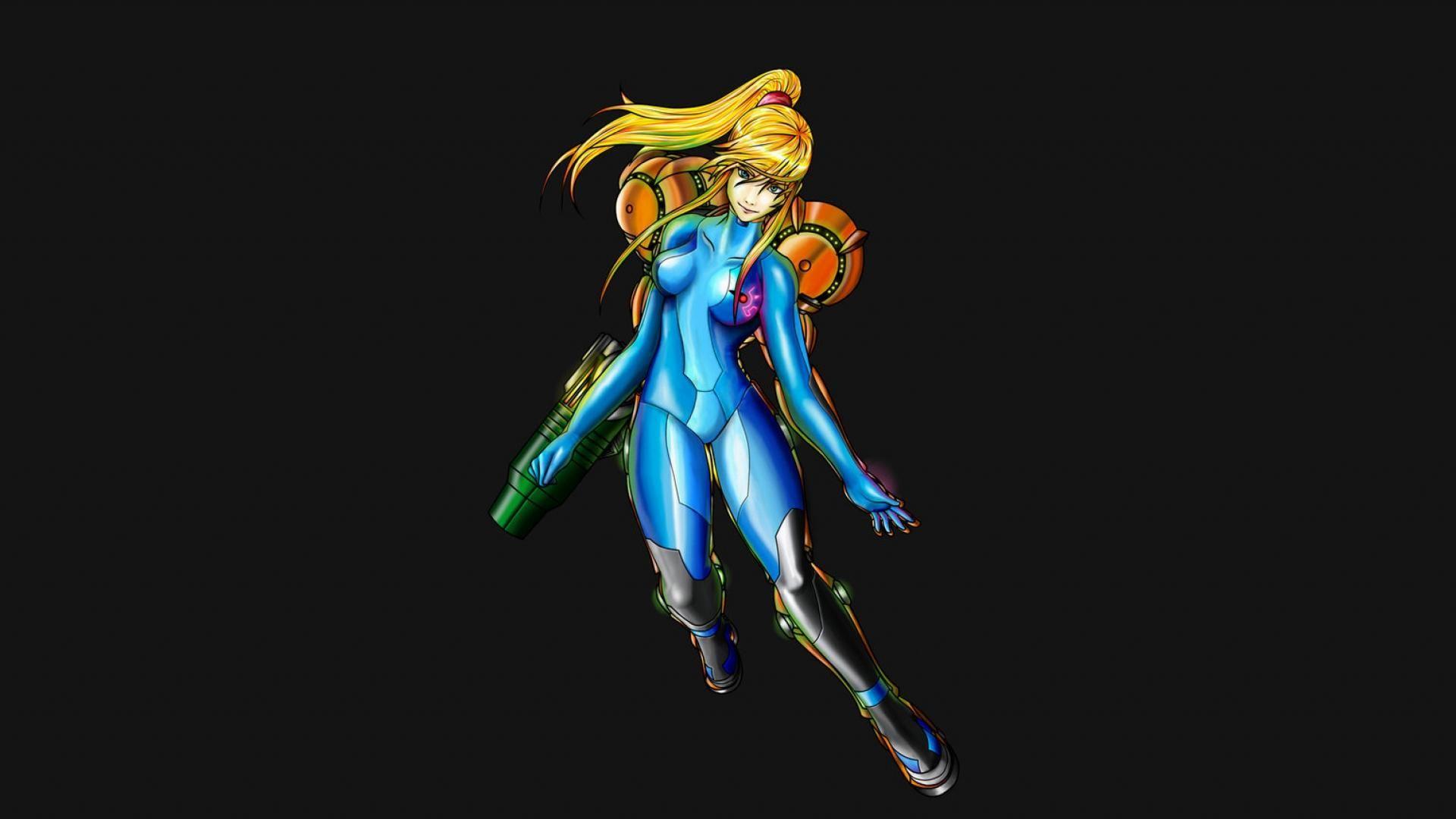
Finding a decent zero suit samus wallpaper shouldn't feel like a boss fight in Metroid Dread. Honestly, it’s frustrating. You open Google, type in the search, and get flooded with low-res upscales, AI-generated disasters with six fingers, or fan art that leans way too hard into the "oops" territory. Samus Aran is arguably the most iconic woman in gaming history, yet finding a desktop background that captures her actual vibe—stoic, dangerous, and incredibly capable—is a chore.
She isn't just a blonde girl in a blue jumpsuit. She's the person who blew up Zebes.
If you're looking for something that looks good on a 4K monitor or a vertical OLED phone screen, you have to know where to dig. Most of the "top" wallpaper sites are just scrapers. They pull images from Pinterest or DeviantArt without credit, compress them until they look like a PS1 texture, and call it a day. If you want the real stuff, you’ve gotta look at the source material and the artists who actually respect the Metroid legacy.
The Evolution of the Zero Suit Aesthetic
The Zero Suit didn't even exist until Metroid: Zero Mission on the Game Boy Advance. Before 2004, if you beat the game fast enough, you just saw Samus in a bikini or a leotard. It was a 16-bit reward for speedrunners. But Zero Mission changed the lore. It introduced the stealth sequence where Samus, stripped of her Power Suit, has to navigate Chozodia with nothing but a paralyzer pistol. That specific blue suit became her identity outside the armor.
When you're picking a zero suit samus wallpaper, you’re usually choosing between three distinct "eras" of her design.
First, there’s the Brawl and Other M look. This is the classic. It’s got the sleek, shiny texture and the short heels (which fans still argue about to this day). Then you have the Smash Ultimate version, which toned down the "latex" look for a more athletic, tactical fabric. Finally, there's the Metroid Dread ending style, which is arguably the most "badass" version we’ve seen yet. It’s less about being a pin-up and more about being a soldier who just survived a mechanical nightmare.
Why Resolution Matters More Than You Think
Don't settle for a 1080p crop if you have a 1440p or 4K display.
Art of Samus usually features high-contrast blues and yellows. On a low-quality file, you'll see "color banding"—those ugly, blocky lines in the gradients of the background. It ruins the immersion. If you’re hunting for a zero suit samus wallpaper, always check the file size. Anything under 2MB for a desktop image is probably too compressed.
Look for "lossless" formats like PNG if you can find them. JPEGs are fine, but they lose detail every time they’re re-uploaded.
Where the Best Artists Actually Post
Forget the generic wallpaper hubs. If you want a zero suit samus wallpaper that looks like it belongs in a museum, you go to ArtStation or Pixiv.
Professional concept artists often post their "fan work" there. Take an artist like Raf Grassetti, the Art Director for God of War. He did a rendition of Samus that went viral a few years ago. It’s hyper-realistic. It shows the grit, the sweat, and the mechanical detail of her gear. That’s the kind of quality that makes a desktop pop.
Then there’s the official Nintendo renders. These are often overlooked because they feel "standard," but the high-resolution press kits from Super Smash Bros. Ultimate are some of the cleanest images available. They have transparent backgrounds, which is a goldmine for anyone who likes to make their own custom layouts using Rainmeter or other desktop customization tools.
The Problem With AI-Generated Wallpapers
It’s the elephant in the room. In 2026, AI is everywhere.
Searching for a zero suit samus wallpaper right now is a minefield of AI "art." At first glance, it looks okay. Then you notice the suit's lines don't connect. Or her hair is merging with her shoulder. Or the Paralyzer pistol looks like a melted hairdryer. Beyond the ethical debate, AI art often lacks the intentionality of a human composition. A human artist knows how to lead your eye across the screen. An algorithm just puts "Samus" in a "cool pose."
Supporting real illustrators like SakimiChan or Artgerm—even if their styles are stylized—results in a much better final product for your screen.
Mobile vs. Desktop: Framing the Bounty Hunter
Your phone needs a different kind of energy.
Vertical wallpapers for Samus usually focus on her height and the "action" of the pose. Since the Zero Suit is all about agility, a good mobile zero suit samus wallpaper usually shows her mid-leap or in a tactical crouch. For your lock screen, look for "Amoled" versions. These have true black backgrounds. On an iPhone or a modern Samsung, this saves battery and makes the blue of the suit look like it's glowing.
For desktop, negative space is your friend.
You don't want Samus's face hidden under your "Recycle Bin" or "Work Stuff" folders. Look for compositions where she is on the left or right third of the image. This follows the "Rule of Thirds" and keeps your icons from cluttering up the art.
Common Misconceptions About Samus’s Gear
When you’re looking at fan-made zero suit samus wallpaper, you’ll notice a lot of mistakes.
- The Symbol: The "Screw Attack" logo is often placed wrong. On the official Zero Suit, it's on her left breast and her back.
- The Gun: It's a Paralyzer. It’s not a lethal blaster. It actually grows a whip-like laser attachment. Wallpapers that show this "Plasma Wire" look way more dynamic than just a static pistol.
- The Jet Boots: Introduced in Smash Bros., these aren't "canon" to the main Metroid games (yet), but they add a cool mechanical element to her feet that breaks up the solid blue.
Beyond the Blue: Different Suit Variations
Who says it has to be blue?
In Smash Bros., we got the pink "Justin Bailey" outfit, which is a deep cut for people who played the 1986 original. There's also the dark grey suit, the green one, and the white/red one that mimics her Fusion Suit colors.
Searching for these specific color variants can help you match your PC's RGB lighting. If you have a red and black setup, a "Dark Samus" themed Zero Suit wallpaper is going to look ten times better than the standard bright blue.
Actionable Steps for a Perfect Setup
Stop just "saving as" from Google Images. If you want a professional-grade look, follow this workflow:
- Search via Yandex or Bing Visual Search: Google’s image filters have gotten worse. Yandex is surprisingly better at finding the original, high-resolution source of an image.
- Use Waifu2x for Upscaling: If you find a piece of art you love but it’s only 720p, use a tool like Waifu2x. It uses neural networks to upscale anime-style art without losing the sharpness of the lines.
- Match your UI: If you're on Windows 11, set your accent color to "Manual" and pick the specific hex code of her suit's blue (usually something around #0055ff).
- Check the Artist’s Patreon: Many artists offer "Ultra HD" or "8K" versions of their work for a few dollars. It’s better than a blurry rip and supports the person who actually drew it.
The Zero Suit isn't just about the aesthetic; it represents Samus at her most vulnerable and her most dangerous. It’s a reminder that even without the armor, she’s the most feared person in the galaxy. Picking the right zero suit samus wallpaper is about finding that balance between the sleek design and the character's grit. Stick to high-bitrate files, avoid the AI "uncanny valley," and always prioritize the original artist’s gallery over a third-party scraper site.